


Help center › System and administration
Access reviews
A periodic review of every user, role and grant and how each was used in 90 days; the AI drafts it, an Admin applies the chosen changes and signs off.
At a glance
- Where
- System › Access reviews (
/app/entitlements/reviews) - Who
- Admins (manage users); the sign-off is by a person. Roles and permissions
Try it in the demo A private sandbox firm, no sign-up. Simulated data only.
Step by step
- System › Access reviews › + Start a review. Vestoris collects every user, role and grant and how each was used in the last 90 days; the AI drafts the review text (marked AI; a standard text without the AI).
- Read the draft and the recommendations: each says what to change (for example Revoke trade from Jamie Ortiz on Growth Fund A) and why.
- Tick the changes you agree with, write a sign-off note, and press Apply ticked changes and sign off.
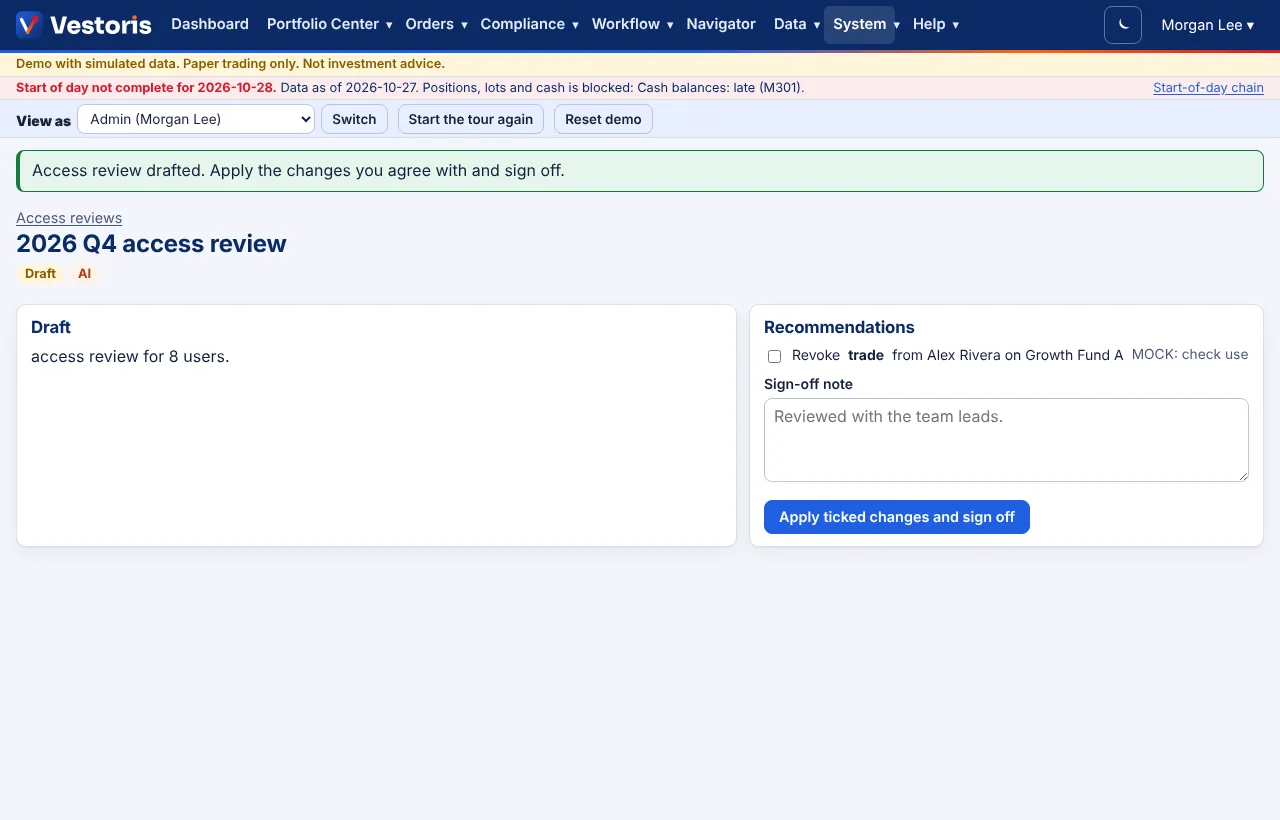
The ticked changes are applied, the review is signed with your name and time, and everything is in the event log. A review waiting for sign-off is a workflow item (SLA 2 days by default).
Related articles
Do it with the API
Every action on this screen can also be done by your own systems, under the same permissions. See Authentication to get a token.
- GET
/api/v1/access-reviewsAccess reviews - POST
/api/v1/access-reviewsDraft a new access review - GET
/api/v1/access-reviews/{id}One access review with its recommendations - POST
/api/v1/access-reviews/{id}/sign-offSign off, applying the chosen recommendations (a person)
Paper trading only: orders and fills in Vestoris are simulated. Nothing here is investment advice.