


Help center › Portfolio Center
Portfolio Center: accounts, holdings, drift and risk
Every account you can see, valued at the latest closes, with holdings, drift from its model, risk, tax lots and activity.
At a glance
- Where
- Portfolio Center › Portfolio Center (
/app/accounts) - Who
- Everyone sees the accounts they may view. Portfolio Managers (with propose) rebalance and propose orders; Admins add and edit accounts, record simulated cash and opening positions. Roles and permissions
Try it in the demo A private sandbox firm, no sign-up. Simulated data only.
Portfolio Center is where portfolio managers look after their accounts: what each holds, how far it has drifted from its model, its risk, and the trades that would bring it back. Trades are always proposals first; nothing is ordered until someone says so. Prices are simulated unless your firm uploads its own.
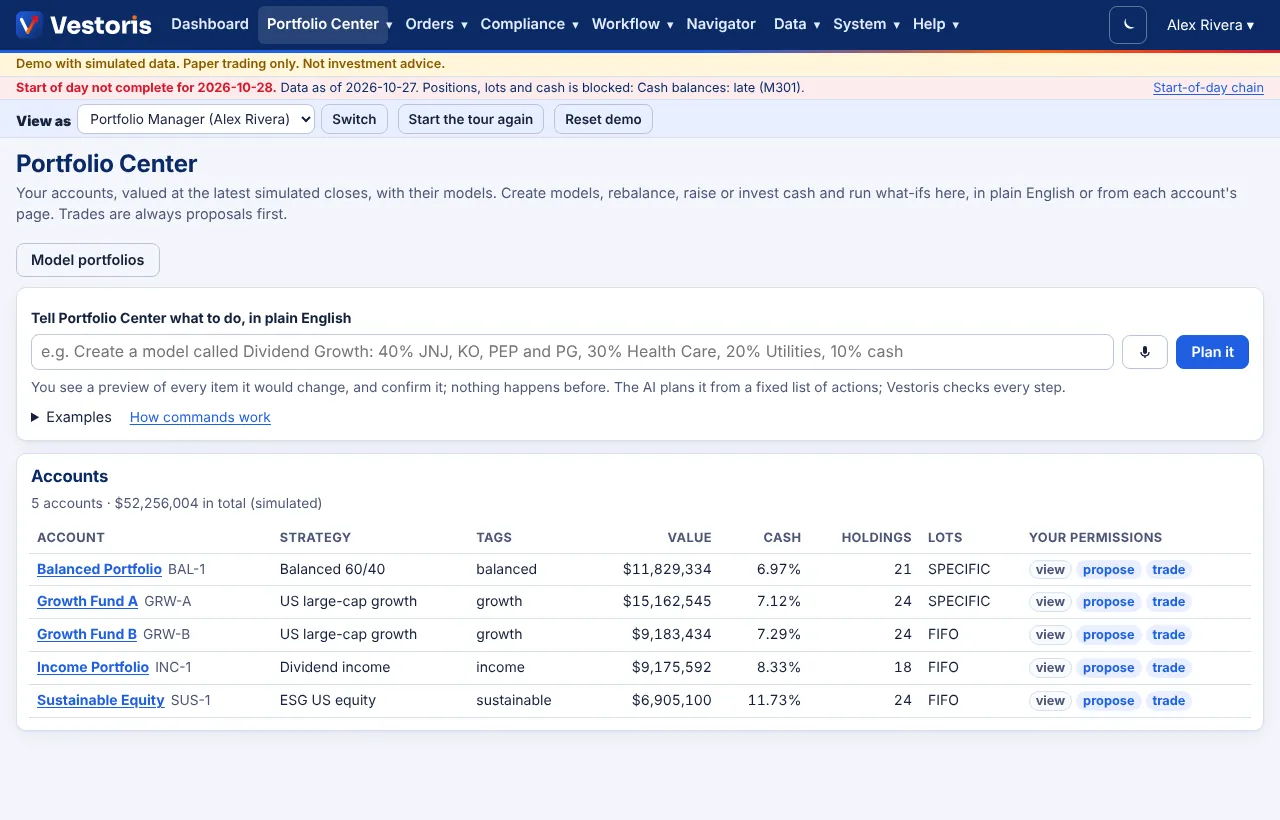
The accounts list
| Column | Meaning |
|---|---|
| Account | Name and code (e.g. Growth Fund A, GRW-A). Click to open the account. |
| Strategy, Tags | The account's strategy and tags. Tags ("growth", "income") let requests name groups of accounts: "Rebalance the growth accounts". |
| Value, Cash | Value at the latest closes; cash as a percent of value. |
| Holdings, Lots | Number of positions; the tax-lot method: SPECIFIC (tax-optimal: losses and the smallest gains sold first) or FIFO. |
| Your permissions | What you hold on the account: view, propose, trade, approve. |
The command bar at the top takes plain-English requests such as "Rebalance the growth accounts to their model, no gains over $10k". See Portfolio Center commands.
An account's page
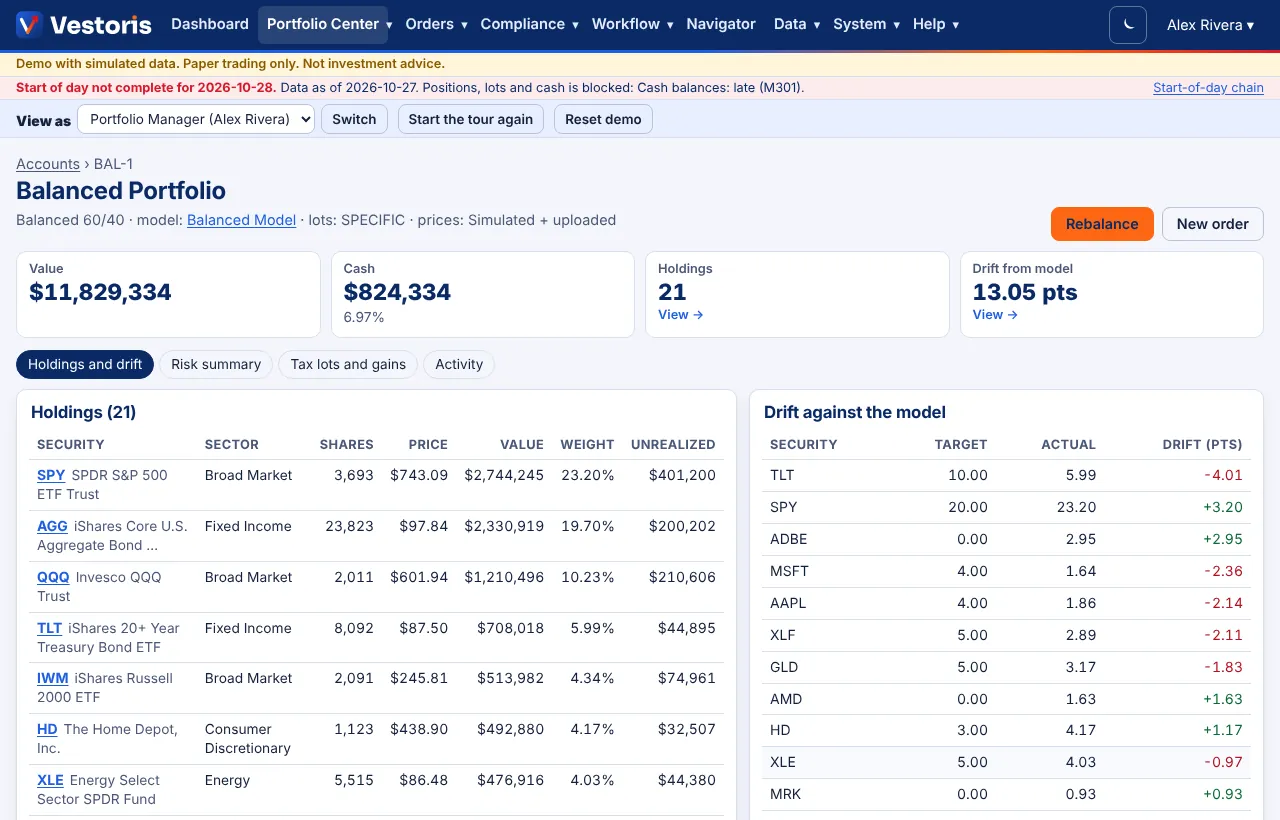
- Header: strategy, model, lot method and the price source (Simulated + uploaded). Rebalance and New order buttons (when you have propose or trade).
- Holdings: security, sector, shares, price, value, weight and unrealized gain or loss.
- Drift against the model: target, actual and drift in points per security, largest first. A security held but not in the model has a target of 0.

- Risk summary: sector exposure, issuer exposure (top 10), concentration (top position, top 5, HHI and the effective number of holdings) and correlation spikes (pairs of holdings whose recent correlation jumped).
- Tax lots and gains: open tax lots with cost and date, and gains realized this year.
- Activity on this account: orders, fills, cash movements and loads that touched it.
- User-defined fields of the account (for example Mandate code).
How to…
Rebalance an account: open it, press Rebalance, set the constraints and press Propose trades. See Rebalancing and what-ifs.
Enter an order for it: New order opens the order form with the account selected. See New order.
Record simulated cash (Admins, manage accounts): under Drift against the model, open Simulated cash in or out, enter the amount, choose Deposit or Withdrawal and press Record. A withdrawal cannot exceed the cash.
Add an opening position (Admins): under the lots, open Add an opening position: symbol, shares, cost per share and purchase date, then Add lot.
Add or change an account (Admins): Portfolio Center › + Add account (or Edit on the account): name, code, strategy, tags, model portfolio, tax-lot method, starting cash and user-defined fields. New accounts are visible to Admin, Compliance and Operations; grant others on Users and permissions.
Tips
- Drift uses each security's weight against the model's target; the model's drift tolerance decides what a rebalance ignores.
- Every number is computed from the stored positions and the latest closes; nothing is estimated by the AI.
- Accounts can also be loaded from files or feeds: see Loading center.
Troubleshooting
- An account is missing: you have no view on it; ask an Admin.
- No Rebalance button: you need propose on the account (Portfolio Manager or Admin).
- "This account has no model": assign a model on the account's edit page or with a command ("Assign the Growth model to GRW-B").
Related articles
Do it with the API
Every action on this screen can also be done by your own systems, under the same permissions. See Authentication to get a token.
- GET
/api/v1/accountsThe accounts you can see, valued at the latest simulated closes - GET
/api/v1/accounts/{id}One account - POST
/api/v1/accountsAdd an account (simulated cash) - PATCH
/api/v1/accounts/{id}Change an account, incl. its model (If-Match) - GET
/api/v1/accounts/{id}/positionsPositions with value and weight - GET
/api/v1/accounts/{id}/lotsOpen tax lots - GET
/api/v1/accounts/{id}/cashCash balance and recent (simulated) movements - POST
/api/v1/accounts/{id}/cashDeposit or withdraw simulated cash - GET
/api/v1/accounts/{id}/driftDrift against the account's model - GET
/api/v1/accounts/{id}/riskConcentration, exposures and factor betas
Paper trading only: orders and fills in Vestoris are simulated. Nothing here is investment advice.