


Order health and exceptions
The Operations queue: stuck orders, likely duplicates and executions waiting for their allocation; and the end-of-day compliance batch.
At a glance
- Where
- Orders › Order health and exceptions (
/app/orders/health) - Who
- Operations (and Compliance, Admin). Others can read it. Roles and permissions
Try it in the demo A private sandbox firm, no sign-up. Simulated data only.
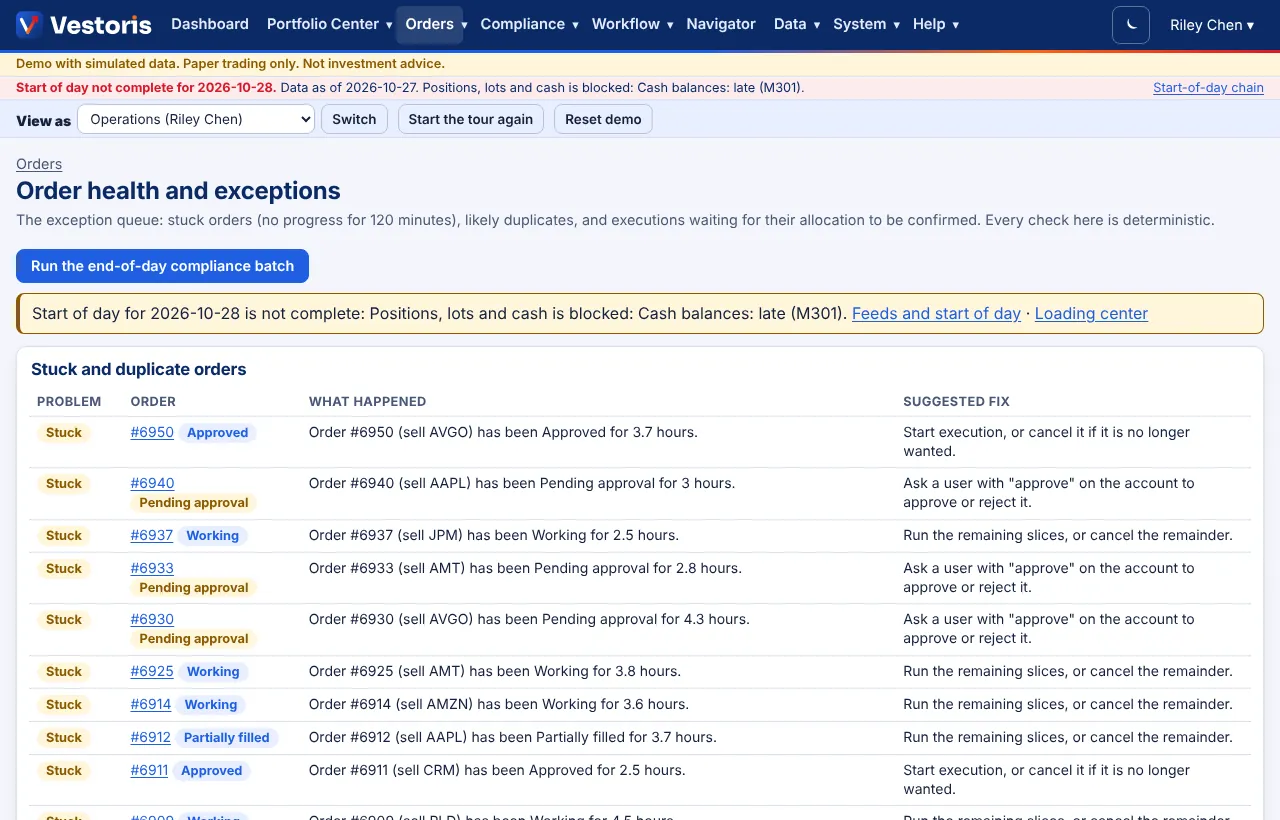
What is on it
- Run the end-of-day compliance batch: runs the post-trade check over every account's holdings now (it also runs on schedule). New breaches become violations.
- A start-of-day banner when the morning data is not complete, with links to Feeds and the Loading center.
- Stuck and duplicate orders: the problem, the order and its state, what happened, and a suggested fix. An order is stuck when it made no progress for the firm's "stuck" time (Firm settings); a duplicate has the same security, side, quantity and accounts as another entered minutes apart.
- Executions waiting for allocation: filled orders whose split between accounts Operations has not confirmed yet.
Suggested fixes
| Stuck in | Fix |
|---|---|
| Pending compliance | Cancel it and enter it again (the check did not finish). |
| Pending approval | Ask a user with approve on the account to approve or reject it. |
| Approved | Start execution, or cancel it if it is no longer wanted. |
| Working / Partially filled | Run the remaining slices, or cancel the remainder. |
Every check here is deterministic. The fixes are suggestions: you act on the order's own page or the blotter.
Confirm an allocation
Open the order and press Confirm allocation (Operations). Over the API: POST /orders/{id}/allocate.
Related queues
Each exception is also a workflow item ("Exception: open", SLA 1 hour by default), so it shows on the workflow monitor with an owner and escalation. Alerts for stuck and duplicate orders are on Alerts.
Related articles
Do it with the API
Every action on this screen can also be done by your own systems, under the same permissions. See Authentication to get a token.
- POST
/api/v1/orders/{id}/allocateConfirm the allocation of executions (Operations) - POST
/api/v1/orders/{id}/cancelCancel the unfilled part - GET
/api/v1/surveillance/alertsSurveillance and anomaly alerts - GET
/api/v1/workflow/itemsItems in flight you can see (the monitor's board)
Paper trading only: orders and fills in Vestoris are simulated. Nothing here is investment advice.