


Help center › System and administration
My API access
Personal access tokens for your own scripts, acting as you; and the apps you authorized.
At a glance
- Where
- System › My API access (
/app/me/api) - Who
- Everyone who signed in with their authenticator code. Roles and permissions
- API
- GET
/meGET/scopes
Try it in the demo A private sandbox firm, no sign-up. Simulated data only.
Personal access tokens let your own scripts call the Vestoris API as you: with the scopes you choose, never more than your role and privileges allow, and until the date you set.
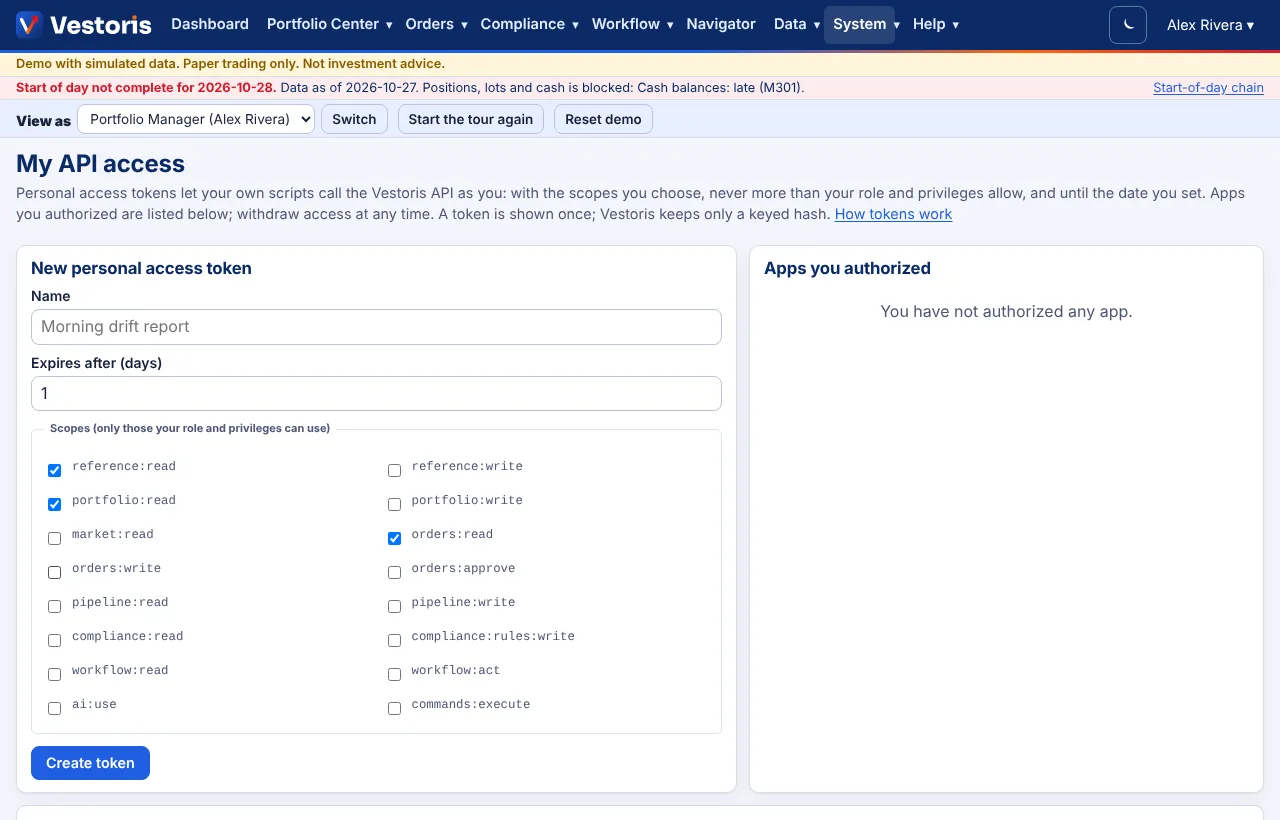
Create a token
- System › My API access.
- Name it after the script ("Morning drift report"), choose Expires after (days), and tick the scopes (only those your role and privileges can use).
- Create token and copy it (
vpt_…): it is shown once. Vestoris keeps only a keyed hash. - Use it:
curl https://vestoris.com/api/v1/me -H "Authorization: Bearer $VESTORIS_TOKEN". Keep it in an environment variable or a secrets store, never in the script.
Apps you authorized
Apps you gave access to through a consent screen, with their scopes; withdraw access at any time.
Your tokens
Each token with its scopes, expiry and last use; Revoke it at any time.
Notes
- A token acts as you: four eyes apply, accounts you cannot see answer 404, and sign-offs need a confirmation token. See Confirmations.
- You can create tokens only after signing in with your authenticator code; tokens themselves need no code.
Related articles
Do it with the API
Every action on this screen can also be done by your own systems, under the same permissions. See Authentication to get a token.
- GET
/api/v1/meWho the token acts as: user or service account, firm, role, privileges, scopes - GET
/api/v1/scopesEvery scope with its meaning
Paper trading only: orders and fills in Vestoris are simulated. Nothing here is investment advice.