


The compliance dashboard
Unresolved violations by severity, kind and age; what waits for your sign-off; and the daily compliance brief.
At a glance
- Where
- Compliance › Compliance dashboard (
/app/compliance) - Who
- Users with review compliance: Compliance (and Admins they grant it to). Roles and permissions
Try it in the demo A private sandbox firm, no sign-up. Simulated data only.
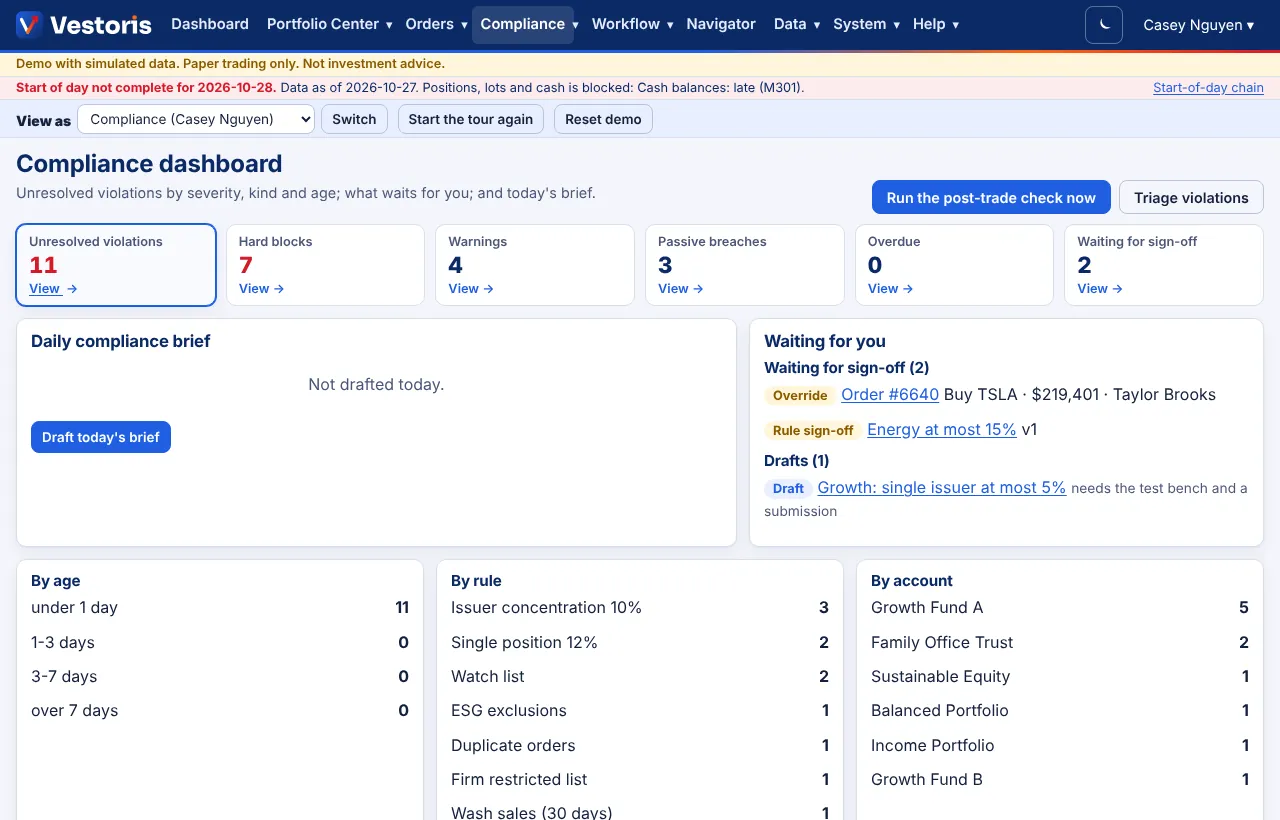
What is on it
- Run the post-trade check now and Triage violations (the AI suggests an order to work them in; nothing changes by itself).
- Boxes: unresolved violations, hard blocks, warnings, passive breaches, overdue, and rules waiting for sign-off. Each View → opens the filtered list.
- Daily compliance brief: Draft today's brief writes a summary of the day from the records (the AI drafts it; the facts are counted by code).
- Waiting for you: overrides to decide and rules to sign off (never your own), and your drafts that still need the test bench and a submission.
- By age, by rule, by account: where the open violations are.
- Unresolved violations: the list, to acknowledge, assign, resolve, waive or escalate.
A typical morning
- Read the brief and the boxes.
- Decide pending overrides (Overrides).
- Sign off rules waiting for you (Rules and sign-off).
- Work the overdue and blocking violations first (Violations).
- Review new surveillance alerts (Surveillance).
Related articles
Do it with the API
Every action on this screen can also be done by your own systems, under the same permissions. See Authentication to get a token.
- GET
/api/v1/compliance/violationsViolations - GET
/api/v1/overridesOverride requests - GET
/api/v1/compliance/rulesRules (every version) - POST
/api/v1/compliance/reportsGenerate a report for a period (202: a job)
Paper trading only: orders and fills in Vestoris are simulated. Nothing here is investment advice.