


Finding your way: menus, search and themes
The app menu, greyed-out items, the Help menu, searching help, light and dark themes, and using Vestoris on a phone.
At a glance
- Where
- The menu bar at the top of every page
- Who
- Everyone. Roles and permissions
- API
- GET
/me
On this page
The app menu
The menu bar is the same for everyone: Dashboard, Portfolio Center, Orders, Compliance, Workflow, Navigator, System and Help. Open a group with its name (it goes to the first page you may use) or the ▾ button (the list of its pages). Data and Interfaces is a submenu of System: point at it, click it, or press → on it to open its list beside the menu (on a phone it opens inside the ☰ menu).
| Menu | Pages |
|---|---|
| Portfolio Center | Portfolio Center, Intent Pipeline, Model portfolios, What-if, Securities and prices |
| Orders | Trade blotter, Order list, New order, Execution quality, Order health and exceptions |
| Compliance | Compliance dashboard, Rules, Write a rule, Rule register, Packages and lists, Violations, Overrides, Surveillance alerts, Reports |
| Workflow | Workflow monitor, My work, Bottlenecks, Workflow rules, Desks and SLAs |
| Navigator | The AI assistant |
| System › Data and Interfaces | Feeds and start of day, Loading center, Load history, Data quality, History and as-of, Templates and field dictionary, Drop box and transfer, Scheduled jobs, Legacy API keys, User-defined fields, Reference data values, Data Feed Reference |
| System | Data and Interfaces (the submenu above), Users and permissions, Access reviews, Role suggestions, Alerts, Event log, AI interaction log, Firm settings, API clients and webhooks, My API access, API console (demo) |
| Help | Help center, Developers and API reference, Data Feed Reference |
Every help article has an At a glance box with the menu path ("Where") and the roles that can use the screen ("Who").
Greyed-out items
Every item is shown, so people can see what Vestoris does. An item your role and privileges do not allow is greyed out and is not a link; hover it (or use a screen reader) to see why, for example "Needs the privilege to load data." Ask your Admin if you need it.
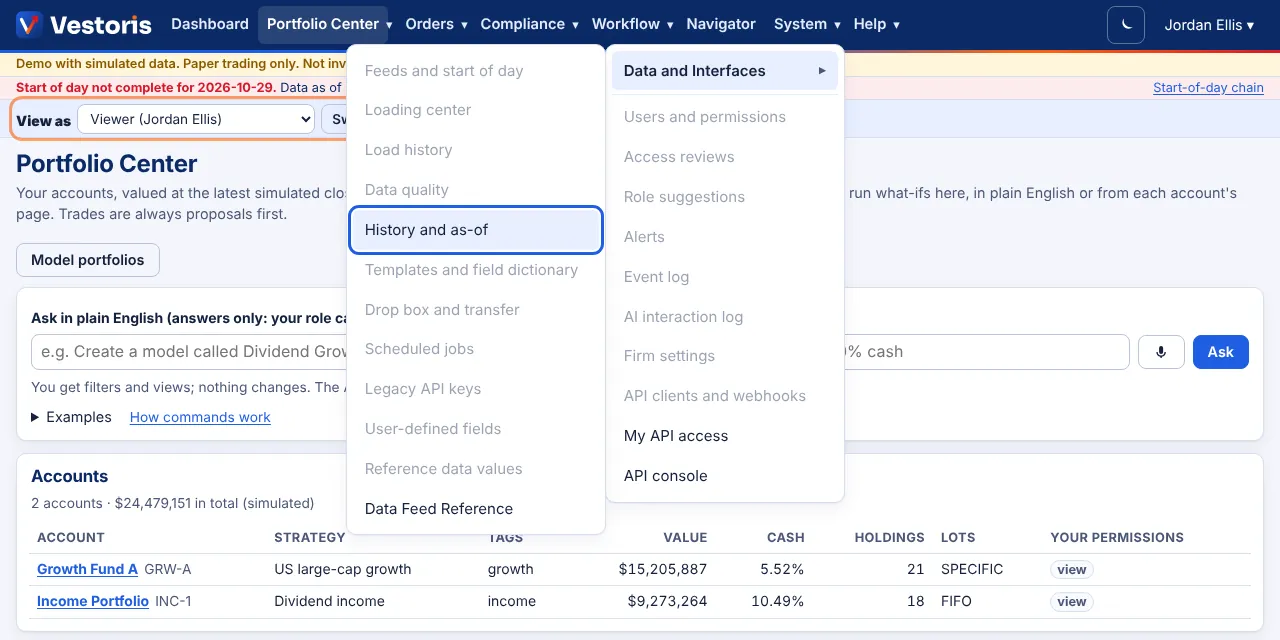
Help is always there
The Help menu, the help center and the developer docs are public: they need no sign-in. Search them from the box at the top of the help center or of any article: it covers every help article, the developer docs, the API reference and the Data Feed Reference. Press / to jump to the search box, the arrow keys to pick a suggestion and Enter to open it. Titles and headings rank above matches in the text; type a call such as POST /orders to go straight to that endpoint.
Light and dark
The moon and sun button (top right) switches between light and dark; your choice is kept in this browser. Without a choice Vestoris follows your device's setting. The trade blotter opens dark unless you chose light.
On a phone or tablet
Every page works on a phone: the menu becomes ☰, wide tables scroll sideways inside their box, and the blotter shows each order as a card with its details full screen. Uploading a folder needs a .zip of it on phones and tablets.
Keyboard
- / focuses the help search; Ctrl+K the blotter search.
- On the blotter, arrow keys move the selection and Enter opens the order's details.
- Every page starts with a Skip to content link.
Related articles
Do it with the API
Every action on this screen can also be done by your own systems, under the same permissions. See Authentication to get a token.
- GET
/api/v1/meWho the token acts as: user or service account, firm, role, privileges, scopes
Paper trading only: orders and fills in Vestoris are simulated. Nothing here is investment advice.