


Help center › Data and Interfaces
Drop box and transfer
The firm's managed-file-transfer drop box (explicit FTPS), its folders, the HTTPS pull allow-list, alerts and the outbound trade file.
At a glance
- Where
- System › Data and Interfaces › Drop box and transfer (
/app/feeds/mft) - Who
- Operations and Admins (load data); only Admins set up the drop box and change the allow-list. Roles and permissions
Try it in the demo A private sandbox firm, no sign-up. Simulated data only.
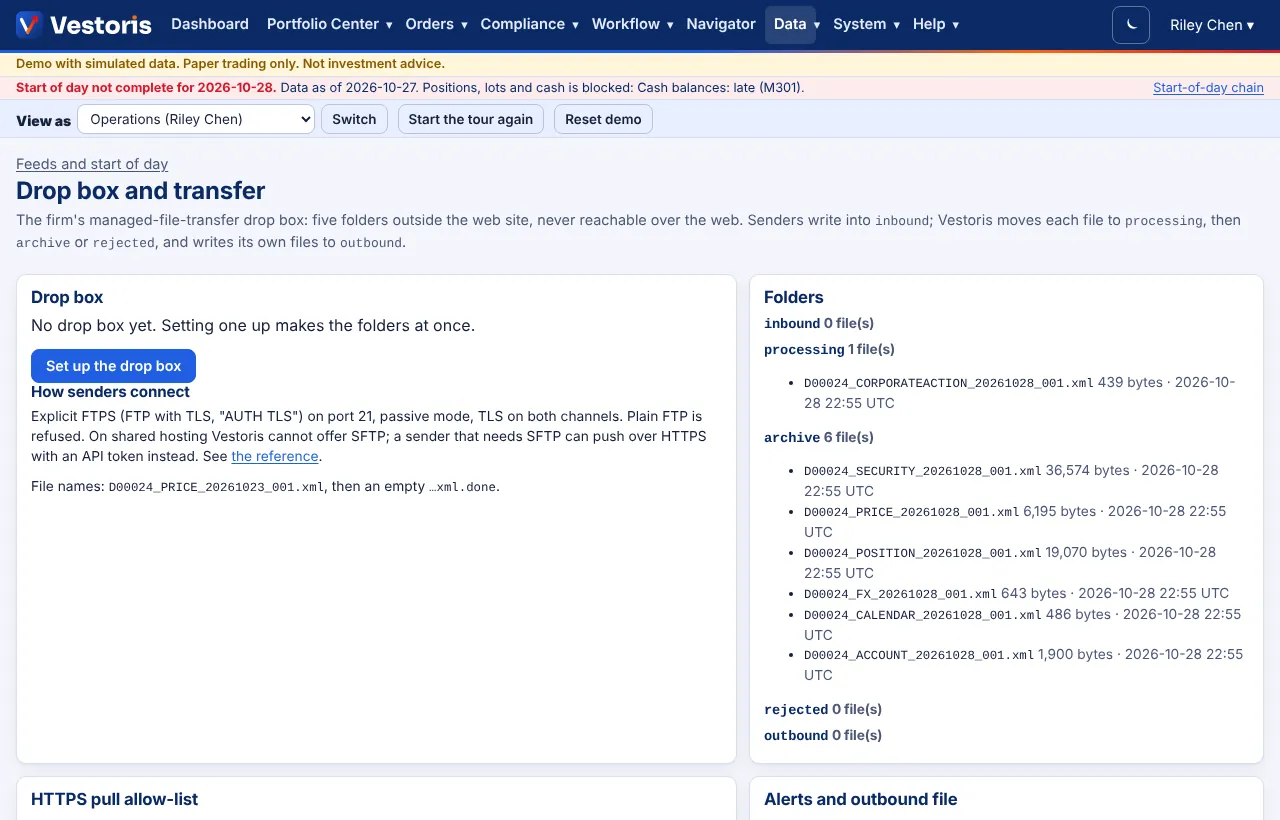
The folders
Five folders outside the web site, never reachable over the web. Senders write into inbound; Vestoris moves each file to processing, then archive or rejected, and writes its own files to outbound. Set up the drop box creates them.
How senders connect
Explicit FTPS (FTP with TLS, "AUTH TLS") on port 21, passive mode, TLS on both channels. Plain FTP is refused. On shared hosting Vestoris cannot offer SFTP; a sender that needs SFTP can push over HTTPS with an API token instead (API clients, POST /api/v1/feeds/{id}/files). File names follow the feed's pattern, e.g. ACME_PRICE_20261023_001.xml, then an empty …xml.done.
HTTPS pull allow-list
A pull feed may fetch only from these hosts, only over HTTPS on port 443, never from a private or internal address, and never following redirects. An Admin changes the list.
Alerts and the outbound file
Late, missed and held files alert the firm's Operations users (or the operations email). The end-of-day trade file writes the simulated trades of the day to outbound when switched on.
In the demo the drop box is a folder inside your sandbox; there is no FTP server.
Related articles
Do it with the API
Every action on this screen can also be done by your own systems, under the same permissions. See Authentication to get a token.
- POST
/api/v1/feeds/{id}/filesPush a file to an HTTPS-push feed (the feed's data:load scope) - GET
/api/v1/feedsFeeds and their schedule
Paper trading only: orders and fills in Vestoris are simulated. Nothing here is investment advice.