


Help center › System and administration
The event log
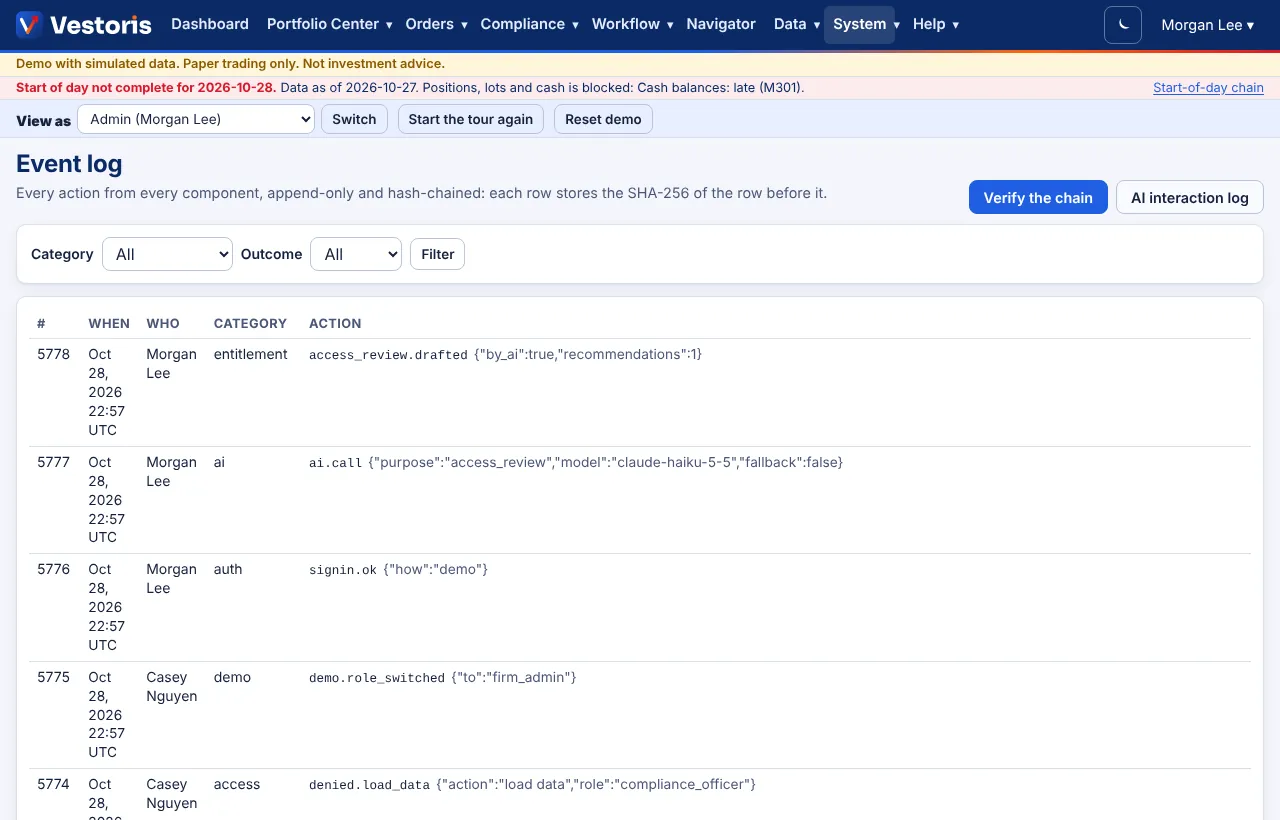
Every action from every component, append-only and hash-chained; filter it, open a row, and verify the chain.
At a glance
- Where
- System › Event log (
/app/events) - Who
- Users with view events: Compliance and Admins. Roles and permissions
Try it in the demo A private sandbox firm, no sign-up. Simulated data only.
On this page
Every action in every component (sign-ins, refusals, proposals, orders, fills, rule changes, reviews, loads, workflow actions, demo role switches) goes into one append-only log.
Reading it
Filter by category (auth, access, entitlement, portfolio, market, order, execution, compliance, surveillance, ai, pipeline, admin, report, blotter, operations, data, feeds, workflow…) and outcome (ok, denied, failed). Each row: number, when, who, category, action with its details (e.g. rule.signoff {"as":"compliance",…}), the record it was on, the outcome, and the hash.
The hash chain
Each row stores the SHA-256 of the row before it, so changing or removing a row breaks the chain. Verify the chain recomputes it and says whether every hash matches, or the first row that does not.
What it is for
Who did what and when; every refusal (with what was missing); the evidence behind sign-offs, overrides and loads. Over the API, GET /events pages through it and GET /events/verify verifies it.
Related articles
Do it with the API
Every action on this screen can also be done by your own systems, under the same permissions. See Authentication to get a token.
- GET
/api/v1/eventsThe hash-chained event log - GET
/api/v1/events/verifyVerify the firm's hash chain
Paper trading only: orders and fills in Vestoris are simulated. Nothing here is investment advice.