


Desks and SLAs
Desks with members and an assignment mode; each stage's SLA and escalation chain; business hours.
At a glance
- Where
- Workflow › Desks and SLAs (
/app/workflow/setup) - Who
- Readable by Operations and Admins; only Admins change desks and SLAs. Operations and Admins can set others off desk. Roles and permissions
Try it in the demo A private sandbox firm, no sign-up. Simulated data only.
On this page
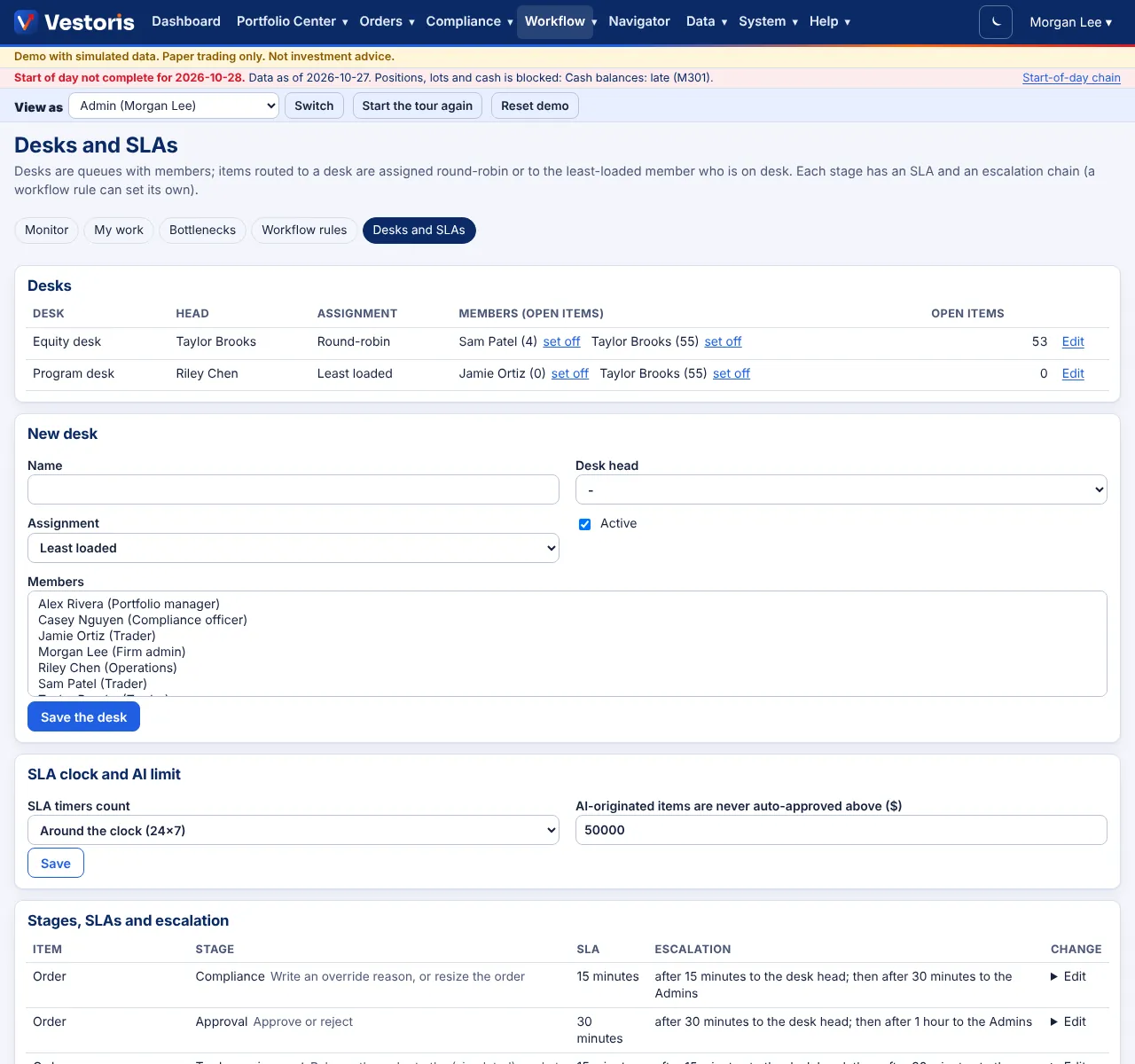
Desks
A desk is a queue with members. Items routed to a desk are assigned round-robin or to the least loaded member who is on desk. Each desk has a head (the first escalation). Admins create desks, add members and choose the mode. Anyone can go off desk (Operations and Admins can set others): their open items are re-routed to an available colleague, or back to the queue.
Stages, SLAs and escalation
Each stage has a default SLA and an escalation chain: after the SLA to the desk head, after twice the SLA to the Admins. Admins can change them per stage; a workflow rule can set its own. Defaults:
| Item | Stage | SLA |
|---|---|---|
| Order | Compliance (write an override reason, or resize) | 15 minutes |
| Order | Approval | 30 minutes |
| Order | Trader assignment (release to the simulated market) | 15 minutes |
| Order | Allocation (Operations confirms) | 1 hour |
| Soft-rule override | Compliance decision | 30 minutes |
| Compliance rule | Sign-off | 1 day |
| Violation | Open / Acknowledged / Escalated | 4 hours / 1 day / 8 hours |
| Data batch or feed file held | Review | 1 hour / 30 minutes |
| Access review | Sign-off | 2 days |
| Exception | Open | 1 hour |
Business hours
Timers count business hours (08:00 to 18:00 New York on the firm's business days, US holidays and the firm's own closed days skipped) or run around the clock if the firm chooses. The scheduler checks timers every minute and sends escalations by notification and email.
Related articles
Do it with the API
Every action on this screen can also be done by your own systems, under the same permissions. See Authentication to get a token.
- GET
/api/v1/workflow/desksDesks, members and assignment modes - GET
/api/v1/workflow/slasSLA minutes and escalations per stage
Paper trading only: orders and fills in Vestoris are simulated. Nothing here is investment advice.