


The trade blotter
Every order you may see on one dense, live screen: filters, sorting, grouping, saved views, bulk actions, the AI filter and the blotter brief.
At a glance
- Where
- Orders › Trade blotter (
/app/blotter) - Who
- Traders (their landing page), Portfolio Managers, Operations, Compliance and Admins (the use the blotter privilege). A Viewer can filter but not act. Export needs export. Roles and permissions
Try it in the demo A private sandbox firm, no sign-up. Simulated data only.
On this page
The blotter opens dark; the theme button switches it.
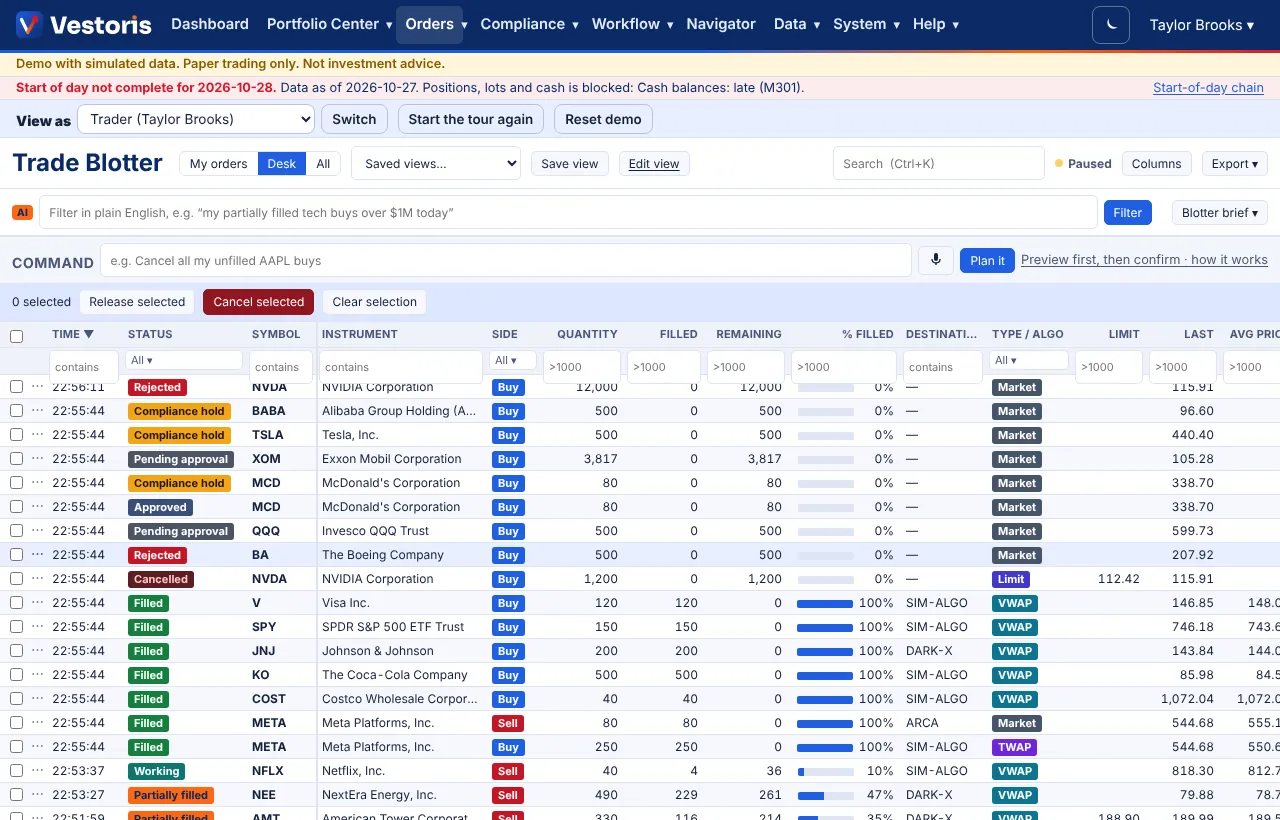
The parts of the screen
- My orders / Desk / All: Desk is the accounts you trade or propose for; All is everything you may view. Rows are filtered on the server, so nothing outside your entitlements is ever sent to the page.
- Saved views, Save view, Edit view: see Blotter views.
- Search (Ctrl+K) looks across the row. Paused / Live shows whether it refreshes. Columns and Export ▾ (CSV or Excel).
- Filter in plain English (AI) and Blotter brief ▾.
- Command: actions on many orders in plain English, previewed first (Blotter commands).
- Release selected / Cancel selected / Clear selection for ticked rows.
Working the grid
- Columns: choose, reorder (drag a header), resize (drag its edge) and pin columns on the left with Columns. Your layout is saved for you.
- Filters: one per column under the header: text contains, numbers like
>1000or<=50, and pick-lists for status, side, algo and compliance. - Sort: click a header; Shift+click adds a second sort.
- Group by account, security, trader, status or side, with subtotals of shares, notional and weighted slippage.
- Live: refreshes every few seconds (paused while the tab is hidden or the pointer rests on a row). Changed rows flash; prices tick green up and red down.
- Keyboard: arrow keys move the selection, Enter opens the detail.
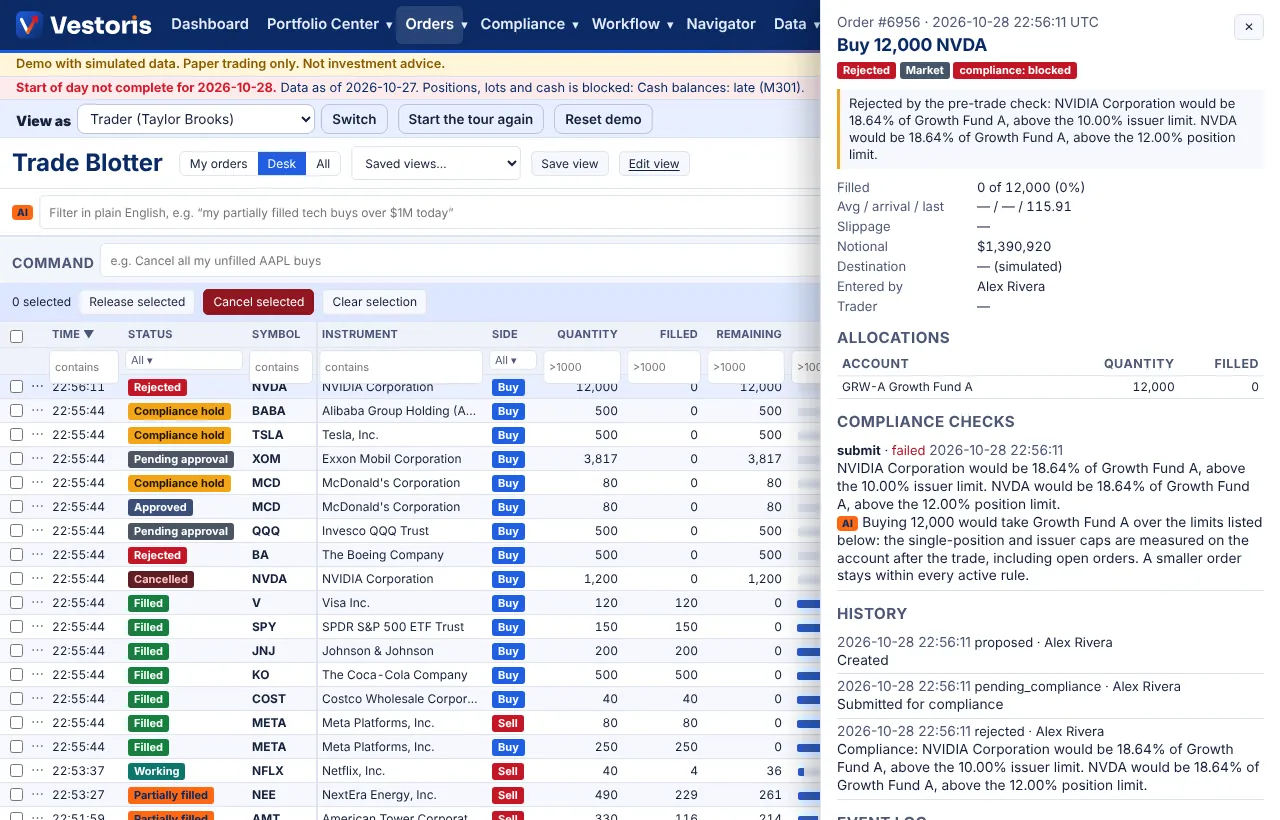
The order drawer
Click a row (or press Enter): status, compliance result and message, fills, slippage, notional, allocations, every compliance check and the history.
Actions
From the row's ⋯ menu, a right-click or the drawer: amend quantity or limit (compliance is re-run), cancel, release to the simulator, approve, override a warning, allocate. Tick rows for bulk cancel or release, confirmed on the page first. Each action checks your permissions on every account of the order.
AI on the blotter
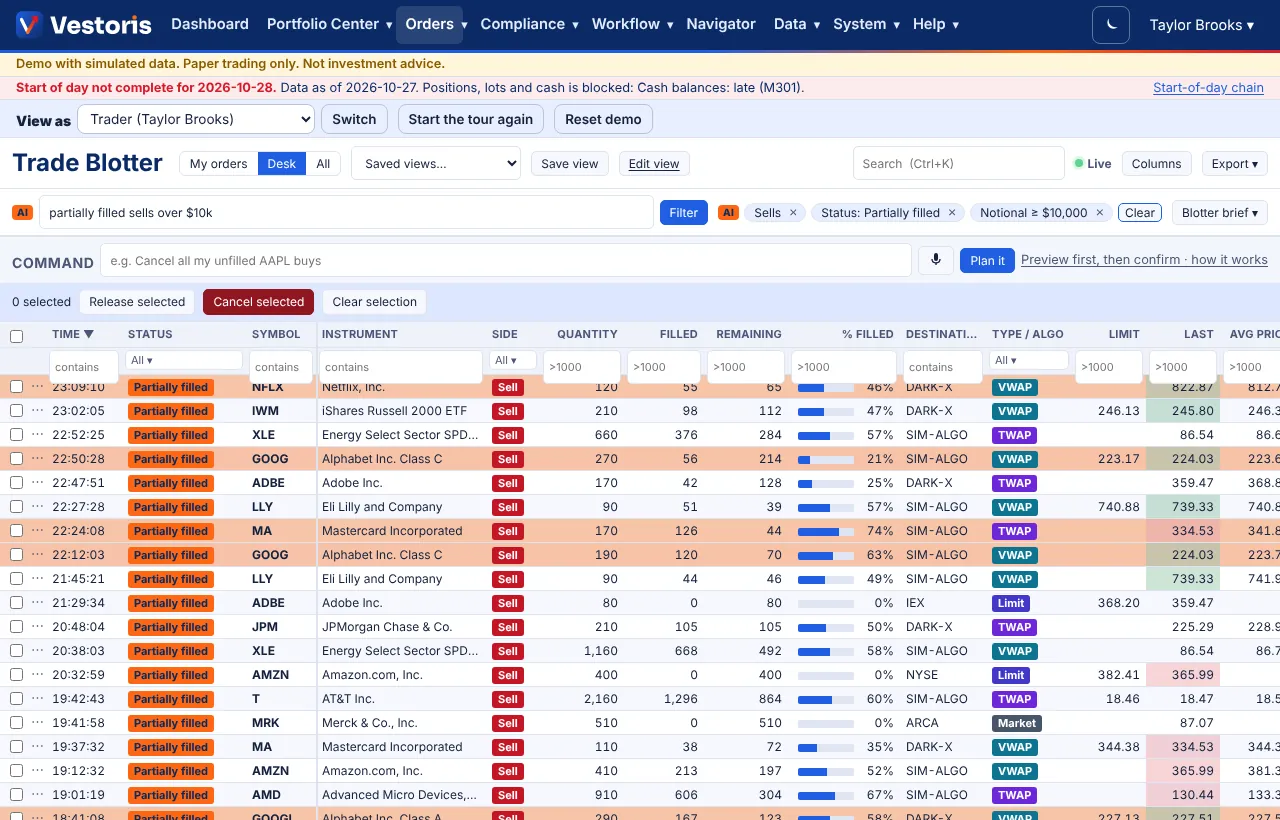
- Filter in plain English: "my partially filled tech buys over $1M today" becomes filter chips you can see and remove. It is never a database query, and it can only narrow what you already see.
- Blotter brief: deterministic checks find stuck orders, slippage outliers, orders near their limit and compliance holds; the AI summarises them with links to the rows.
- Why? on a flagged row explains the problem and may suggest a fix. Open as a proposal sends the fix to the Intent Pipeline; nothing changes until you apply it there.
Export
Export ▾ writes the rows and columns of the view you are on, as CSV or Excel. It needs the export privilege, and every export is in the event log.
On a phone
The rows become cards; the detail opens full screen.
Troubleshooting
- An order is missing: check My orders / Desk / All, the filters (chips and column filters) and the saved view's default filters.
- An action is greyed: you lack trade or approve on one of the order's accounts, or the state does not allow it (only approved orders can be released).
Related articles
Do it with the API
Every action on this screen can also be done by your own systems, under the same permissions. See Authentication to get a token.
- GET
/api/v1/ordersOrders on the accounts you can see - GET
/api/v1/orders/{id}One order with allocations, compliance and history - POST
/api/v1/orders/{id}/releaseRelease an approved order to the simulator (compliance re-checked) - POST
/api/v1/orders/{id}/cancelCancel the unfilled part - POST
/api/v1/orders/{id}/amendAmend quantity or limit (compliance re-checked; If-Match) - POST
/api/v1/orders/{id}/approveApprove (four eyes: never the person who entered it) - POST
/api/v1/orders/{id}/overrideOverride a soft compliance warning with a written reason - POST
/api/v1/orders/{id}/allocateConfirm the allocation of executions (Operations) - GET
/api/v1/blotter/viewsSaved blotter views (yours and the firm's)
Paper trading only: orders and fills in Vestoris are simulated. Nothing here is investment advice.